Reduce security gaps without multiplying consoles.
Deploy the capabilities you need, then manage i-Freeze Premium, i-Freeze Control, Peak Backup, and Ice Lock through i-Freeze Manager.
One connected security portfolio
Reduce security gaps without multiplying consoles.
Deploy the capabilities you need, then manage i-Freeze Premium, i-Freeze Control, Peak Backup, and Ice Lock through i-Freeze Manager.
i-Freeze Premium
Detect, contain, and respond across the endpoint attack path.
Protect connected networks, accessed files, running applications, web activity, and removable devices with layered controls and offline AI-based detection.
Keep backup data encrypted—and the backup server disconnected by default.
Monitor Windows endpoints, encrypt backup data, notify teams, and reduce exposure with scheduled server isolation and on-site or cloud-based destinations.
The portfolio maps protection to the places where risk enters: applications, files, networks, websites, removable devices, mobile endpoints, and backup infrastructure.
i-Freeze Premium
Endpoint Security & EDR
Protect networks, files, applications, web activity, removable devices, processes, registries, and the kernel with offline AI-assisted detection and remote response.
Automate encrypted Windows endpoint backups to on-site or cloud-based destinations, monitor abnormal changes, notify teams, and keep backup servers disconnected by default.
Use i-Freeze Control to manage Windows updates and mobile patch status alongside asset monitoring and compliance checks from the centralized management experience.
Apply managed browsing and web-filtering policies, scan URLs with AI-assisted analysis, monitor applications, and use compliance checks across managed mobile devices.
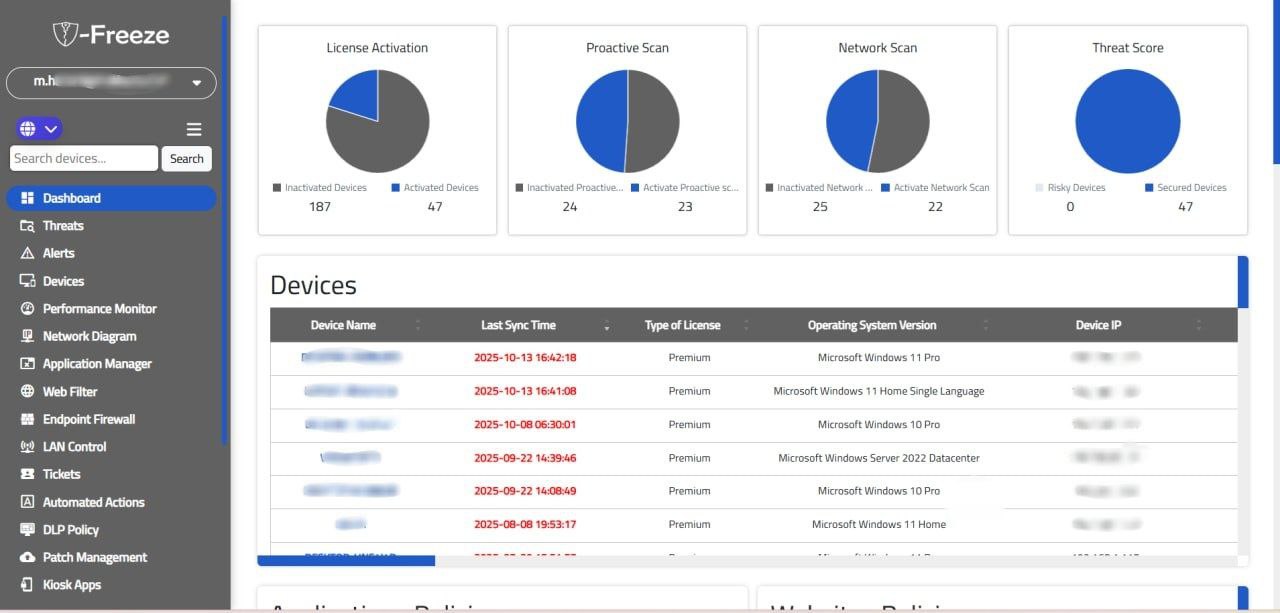
A single web and mobile view of security operations.
i-Freeze Manager integrates endpoint security, device management, backup, and data protection so teams can manage policies and strengthen their security posture without switching tools.